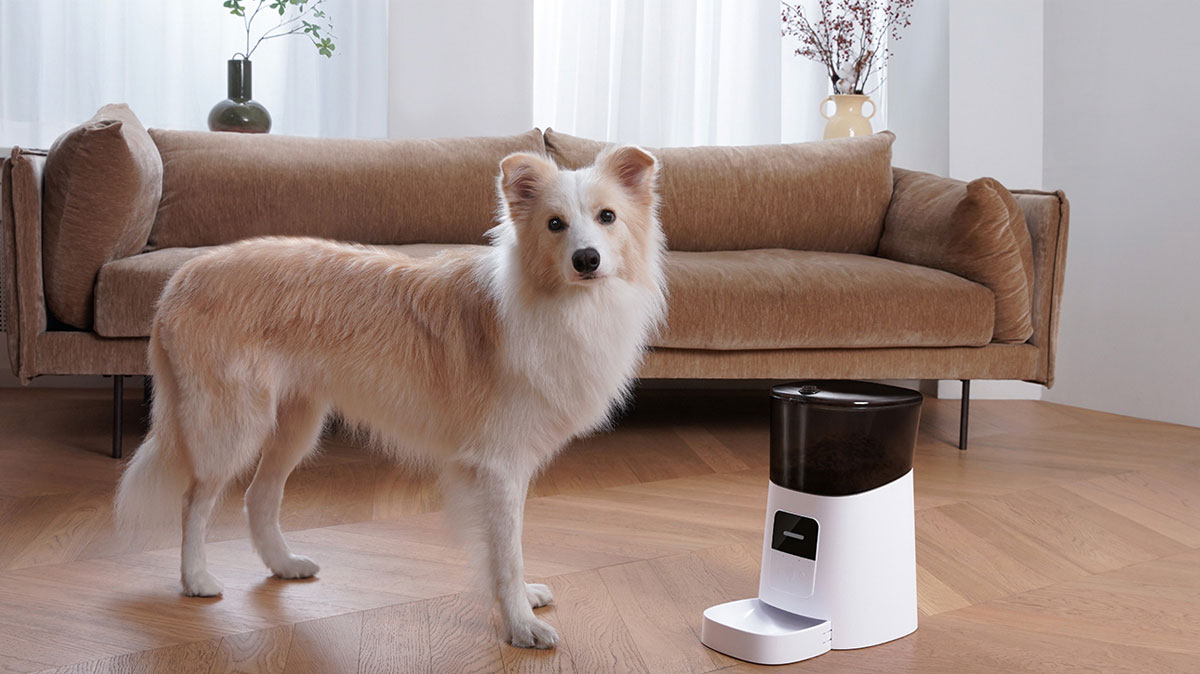
Introduction to WOPET Automatic Pet Feeder
Pets hold a special place in our hearts, and their well-being is a top priority for pet owners. Among the responsibilities of pet ownership is ensuring that our furry friends are fed consistently and at the right times. However, busy schedules and unpredictable activities can make this challenging. This is where the WOPET automatic pet feeder comes into play, offering a solution that blends technology with convenience to simplify pet feeding routines.
What is the WOPET Automatic Pet Feeder?
The WOPET Automatic Pet Feeder is a technologically advanced device designed to dispense food for your pets automatically. Whether you are away at work, traveling, or simply tied up with chores around the house, this feeder ensures that your pet receives their meals on schedule. The setup typically includes a storage container for pet food, a programmable dispensing mechanism, and options for manual feeding directly from the device.
Key Features of WOPET Feeders
WOPET feeders come packed with an array of features that can significantly enhance your pet feeding experience. Some of the most notable features include:
- Programmable Feeding Schedule: Allows you to set specific times for feeding, managing when and how much food your pet receives.
- Portion Control: Provides the ability to dispense precise measurements of food, ensuring your pet’s diet is controlled and consistent.
- Large Capacity: Many models, like the WOPET Patrol, come with a storage capacity that can hold several meals, reducing the need for frequent refills.
- Wi-Fi Connectivity: Certain models allow you to connect via a smartphone app, enabling you to monitor feeding remotely, adjust settings, and even interact with your pet while you’re away.
- Feeding Alerts: Notifications can be sent to your smartphone to let you know when your pet has been fed or if the food supply is running low.
Why Choose an Automatic Feeder?
There are compelling reasons to opt for an automatic feeder like those offered by WOPET. Firstly, these feeders relieve the stress of keeping to a strict feeding schedule, which can be especially helpful for busy individuals or families. Additionally, they help instill a routine for your pet, which can be beneficial for their overall health. With the added ability to control portions, automatic feeders also mitigate the risk of overfeeding, which can lead to obesity.
Setting Up Your WOPET Automatic Pet Feeder
Unboxing and Assembly
Setting up your WOPET automatic pet feeder is a straightforward process. Upon unboxing, you'll typically find the main feeding unit, a food storage container, and a user manual. Start by following the assembly instructions carefully. Ensure that all components are securely fastened and that the food container is appropriately attached to the feeder, as this will enable smooth operation during feeding times.
Connecting to WiFi and App Integration
For models that offer Wi-Fi connectivity, download the designated app (available on both iOS and Android devices). Follow the on-screen instructions to connect the feeder to your home Wi-Fi network. This integration allows you to program meals, monitor feeding times, and even provide remote access to observe your pet. Troubleshooting app connectivity can occasionally pose challenges; if you encounter issues, restarting both the feeder and your router may help.
Programming Feeding Schedules
After connecting your WOPET feeder, it’s time to set the feeding schedule. Most models allow you to program multiple meals per day, providing flexibility for different feeding needs. Input the desired times and portions directly through the app or manually on the feeder's control panel. This feature ensures your pet receives consistent nutrition at the right intervals, maintaining a healthy routine that can help reduce anxiety in pets who thrive on structure.
Managing Your Pet's Diet with WOPET
Portion Control and Meal Scheduling
Understanding your pet's dietary needs is crucial, and WOPET feeders are designed to enhance this awareness. With precise portion control, you can set meal sizes according to your pet's weight, age, and activity level. For instance, if your dog requires 500 calories per day, you can calculate the required amount of food and adjust the meal size accordingly. Regular monitoring of your pet's weight and health will inform any necessary adjustments.
Best Practices for Different Pet Sizes
Different pets have varying nutritional needs based on their size and activities. For larger breeds, consider using higher capacity models that can hold more food to ensure they receive an adequate supply without necessitating frequent refills. Smaller dogs and cats can benefit from models designed for smaller portions, ensuring they are not overwhelmed by excessive food. The WOPET automatic pet feeder is versatile enough to accommodate these needs effectively.
Monitoring Your Pet's Eating Habits
With the integration of smart technology, many WOPET feeders allow pet owners to monitor their pets’ eating habits through the associated app. This capability provides insights into your pet's eating patterns, offering valuable data to adjust feeding schedules and portions as necessary. If your pet suddenly decreases their food intake or increases it unexpectedly, these metrics can be crucial for identifying potential health issues early on.
Reviews and Testimonials
User Experiences with WOPET Automatic Pet Feeder
Many pet owners have shared their experiences using the WOPET automatic pet feeder, with a majority praising its functionality and ease of use. Reviews often highlight the convenience of programming feeding schedules via the app, especially for those with busy lifestyles. Additionally, users appreciate peace of mind knowing their pets are adequately fed even when they are not at home, as illustrated by testimonials on the product website and various online forums.
Comparison with Other Brands
When compared to competing brands, WOPET stands out due to its feature-rich offerings and competitive pricing. While several brands offer automatic feeders, the ability to connect to Wi-Fi and control meals from afar sets WOPET apart. Customers often compare WOPET directly with brands like PetSafe and Cat Mate, noting that WOPET's models generally have simpler programming interfaces and greater ease of assembly. Evaluating reviews across multiple platforms reveals that WOPET often excels in both reliability and user satisfaction.
Addressing Common Concerns
Potential buyers often express concern over the reliability and security of Wi-Fi-enabled pet feeders. However, WOPET has invested in robust security measures to safeguard user data. Moreover, customers have reported few connectivity issues, with many noting that the feeders function seamlessly even with intermittent internet outages, thanks to their offline programming capabilities.
Maintenance and Troubleshooting
Cleaning Your WOPET Automatic Pet Feeder
Maintaining hygiene is critical in promoting a healthy feeding environment for your pet. Regular cleaning of your WOPET feeder is essential. Most feeders are designed for easy cleaning, with removable parts that can be washed. It’s advisable to clean the food bowl and storage container weekly. Use mild soap and warm water, and make sure to rinse thoroughly to eliminate any residue or unpleasant odors.
Common Issues and Solutions
As with any electronic device, there may be occasional quirks or issues you encounter. Common problems could include connectivity issues, food jams, or malfunctioning timers. If the feeder isn’t dispensing food, check for blockages and ensure the unit is powered. For connectivity issues, restarting the feeder and your Wi-Fi router usually resolves the problem. For users experiencing difficulty in programming meals, the user manual offers step-by-step instructions that can be quite helpful.
When to Seek Customer Support
If you encounter persistent issues that you cannot resolve through troubleshooting, it may be time to reach out for customer support. WOPET offers a robust customer service system, including online chat, email support, and comprehensive user manuals. Don’t hesitate to utilize these resources, especially if your feeder is still under warranty, as they can provide expert assistance to help you maximize the use of your product.